
Free TexturePacker Alternatives
TexturePacker is the industry-standard sprite packing tool, but the $40-$80 license and watermarked free tier push many indie developers to look for free alternatives. The good news: for 80% of Unity, Godot, Phaser, and Pixi.js projects, a free sprite sheet generator covers every feature you actually use. This guide compares the five best free TexturePacker alternatives in 2026 — from browser-based Sprite Sheet Maker to open-source desktop apps — with honest strengths, limitations, format support, and a verdict on which fits which workflow.
5 Free Alternatives Compared

Why Go Free Instead of Paying for TexturePacker?
TexturePacker is an excellent sprite packing tool with polygon trimming, CLI automation, and 40+ engine presets — but most indie projects never touch those features. Here's why free alternatives win for most developers.
Most Indie Projects Don't Need Polygon Trimming
TexturePacker's headline feature — polygon mesh trimming — pays off on irregular organic sprites and tight VRAM budgets (console, older mobile). Indie web games, jam projects, and most 2D platformers use rectangular frames where trimming saves almost nothing. The free alternatives below all use rectangular bin packing and match TexturePacker's output for these cases.
The Free TexturePacker Tier Has Real Limits
TexturePacker's free version watermarks exports, disables polygon trimming, blocks multipack output, and drops many exporter formats. If you want a tool that's free without those tradeoffs — no watermark, no nag screen, full commercial use — you need a genuinely free alternative, not TexturePacker's crippled free tier.
Free Tools Cover Unity, Godot, Phaser, and Pixi.js
Every major 2D engine accepts JSON Hash, JSON Array, or XML TextureAtlas. Free sprite sheet generators export those same formats, so your Unity, Godot, Phaser, or Pixi.js integration code is identical whether the atlas came from a $80 license or a browser tab.
The 5 Best Free TexturePacker Alternatives
Honest evaluations of the top free sprite sheet tools in 2026 — what each does well, where it falls short, and which workflow it fits best.
1. Sprite Sheet Maker (Browser)
Strengths: free forever with no account or watermark, runs in any browser, exports JSON Hash, JSON Array, CSS sprites, and XML TextureAtlas in one ZIP, supports PNG/JPG/SVG/WebP input, has a built-in GIF-to-sprite-sheet converter, and offers grid/horizontal/vertical layouts with adjustable padding. Limitations: no command-line mode for CI pipelines, no polygon mesh trimming, no multipack output. Best for: indie developers, hobbyists, and small studios shipping to Phaser, Pixi.js, Godot 4, Unity (via XML), or CSS web animations.
2. TexturePacker Free Tier
Strengths: same packing engine as the paid version, desktop app with offline use, and the largest preset library (Unity, Cocos2d, Spine, SpriteKit, Starling, and more). Limitations: watermarks every exported atlas, disables polygon trimming, blocks multipack output, and removes many exporters. Best for: trying out the paid tool before buying, or working on a project where the watermark is acceptable (internal tools, test builds).
3. Free Texture Packer (free-tex-packer.com)
Strengths: genuinely free open-source sprite packer, browser and desktop (Electron) versions, no watermark, exports JSON (TexturePacker-compatible), XML, CSS, and Pixi.js formats, supports trim and rotation. Limitations: older UI, GUI-only with limited CLI, smaller feature surface than TexturePacker, occasional gaps in format support. Best for: developers who want an open-source desktop alternative and don't need polygon mesh trimming.
4. ShoeBox
Strengths: free Adobe AIR desktop app with a grab-bag of sprite tools — packing, tile extraction, bitmap font generation, sprite splitting. Outputs JSON, XML, CSS, and custom formats. Strengths in extracting sprites from existing sheets. Limitations: requires Adobe AIR runtime (becoming harder to install on modern macOS/Windows), UI shows its age, infrequent updates. Best for: developers who need sprite extraction or bitmap font tooling alongside packing.
5. Aseprite Export (if you already own it)
Strengths: if you already paint pixel art in Aseprite (~$19.99), its built-in sprite sheet exporter produces JSON Hash or JSON Array output directly — no second tool needed. Integrates perfectly with Phaser, Pixi.js, and Unity. Limitations: not free (costs ~$19.99 on Steam/itch), only useful if your art lives in Aseprite; can't pack PNGs from Photoshop or Procreate without going through the Aseprite canvas first. Best for: pixel artists who already use Aseprite as their drawing tool.
Format Support Across Free Alternatives
Which export formats each free sprite sheet generator supports — matters most when integrating with specific game engines.
JSON Hash / JSON Array
The de-facto standard for Phaser, Pixi.js, and most modern 2D engines. Supported by Sprite Sheet Maker, Free Texture Packer, ShoeBox, Aseprite, and TexturePacker's free tier (with watermark). This is the safest format to commit to if your engine isn't locked in yet.
XML TextureAtlas
The cleanest import path into Godot 4 SpriteFrames and AtlasTexture resources, and a common Unity plugin format. Supported by Sprite Sheet Maker, Free Texture Packer, and ShoeBox. Aseprite doesn't export XML natively.
CSS Sprites
For web animations using background-image + background-position, or CSS steps() keyframe timing. Supported by Sprite Sheet Maker, Free Texture Packer, and ShoeBox. Essential if you're building a web UI with icon sprites or lightweight DOM animations.
Engine-Specific Formats
Cocos2d plist, Spine atlas, SpriteKit .atlas, libGDX — these are TexturePacker strongholds. Among free alternatives, Free Texture Packer and ShoeBox cover a subset through custom templates, but if you absolutely need native Spine or Cocos2d output, you're either building a custom exporter or paying for TexturePacker.
Engine Format Compatibility
Format support is only useful when it matches the loader in your engine. Use this compatibility map before choosing a free TexturePacker alternative, because Phaser, Pixi.js, Godot, Unity, and Starling do not all prefer the same metadata shape.
Phaser 3: JSON Hash or JSON Array
Phaser 3 works well with TexturePacker-style JSON atlases. Use JSON Hash when frames are named keys, for example frames: { "hero_idle_0001": { frame: { x, y, w, h } } }. JSON Array also works when your exporter stores frames as a list with filename fields.
Pixi.js: JSON Hash
Pixi.js commonly loads a JSON Hash atlas with a PNG image. The important fields are frames, frame rectangles, and optional sourceSize / spriteSourceSize when trimming is enabled. Sprite Sheet Maker and Aseprite both produce Pixi-compatible JSON for typical 2D scenes.
Godot 4: XML TextureAtlas
Godot 4 has the cleanest path with XML TextureAtlas data: <TextureAtlas imagePath="sheet.png"><SubTexture name="idle_0" x="0" y="0" width="32" height="32" /></TextureAtlas>. Use XML when you want named regions for SpriteFrames or AtlasTexture resources.
Unity: XML TextureAtlas or editor slicing
Unity can work from a PNG plus XML TextureAtlas through importer scripts or plugins, and it can also slice uniform grids directly in the Sprite Editor. If your team wants repeatable atlas metadata outside the editor, choose a tool that exports XML with stable SubTexture names.
Starling and XML-based runtimes
Starling-style runtimes expect XML TextureAtlas metadata with SubTexture nodes. Free tools can cover this if they export XML; TexturePacker is still stronger when you need many engine-specific presets, multipack atlases, or build automation.
The Verdict: Which Free Alternative Should You Pick?
Two-sentence recommendations by workflow so you can pick without reading every section.
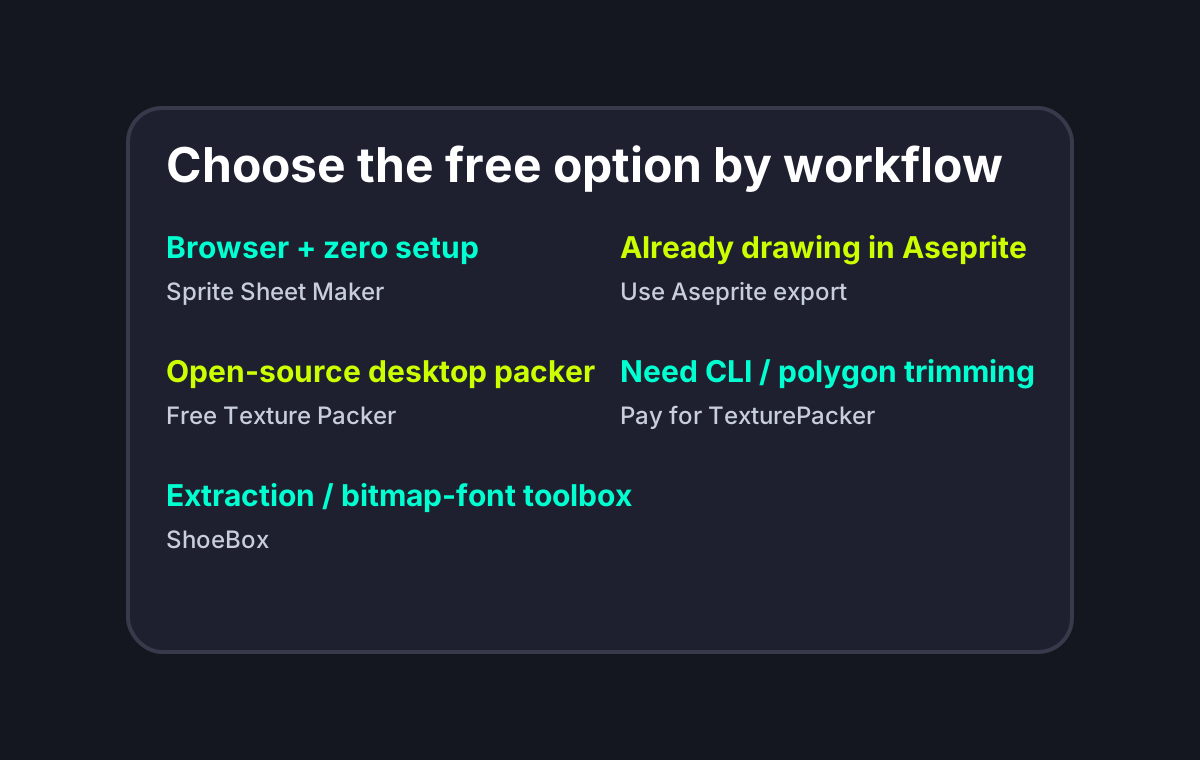
Pick Sprite Sheet Maker if...
You want a free sprite sheet generator that runs in any browser with zero setup, exports JSON, CSS, and XML TextureAtlas in one ZIP, and handles PNG/JPG/SVG/WebP plus GIF input. It covers Phaser, Pixi.js, Godot 4, Unity (via XML), and CSS animations — enough for the vast majority of indie projects. This is the fastest path from 'I have some frames' to 'my engine is rendering them'.
Pick Free Texture Packer if...
You want an open-source desktop sprite packer with offline use and similar output formats to Sprite Sheet Maker. It's a reasonable choice if you specifically need a local desktop install, want to inspect or fork the source, or need to batch-process sheets without internet access.
Pick ShoeBox if...
You need tooling that goes beyond packing — sprite extraction from existing sheets, bitmap font generation, tile extraction. It's a Swiss-army-knife app that a free generator doesn't try to be. The Adobe AIR dependency is the main friction.
Pick Aseprite's built-in export if...
You already paint pixel art in Aseprite. Its sheet exporter produces JSON Hash output ready for Phaser, Pixi.js, and Unity, so you never have to leave your drawing tool. Note: Aseprite itself costs ~$19.99 — only 'free' if you already own it.
Pay for TexturePacker if...
You need polygon mesh trimming, a texturepacker CLI for CI pipelines, native Cocos2d or Spine output, or multipack atlases. These are the features free alternatives genuinely don't replicate. For everyone else, the $40-$80 license doesn't buy output you can actually tell apart in-engine.
Pick the Free Tool by Workflow
Free TexturePacker Alternatives FAQ
Start with the Free Browser Option
Open Sprite Sheet Maker, drag in your frames, and export a game-ready atlas with JSON, CSS, and XML TextureAtlas coordinates — no install, no watermark.