
Sprite Sheet vs Texture Atlas
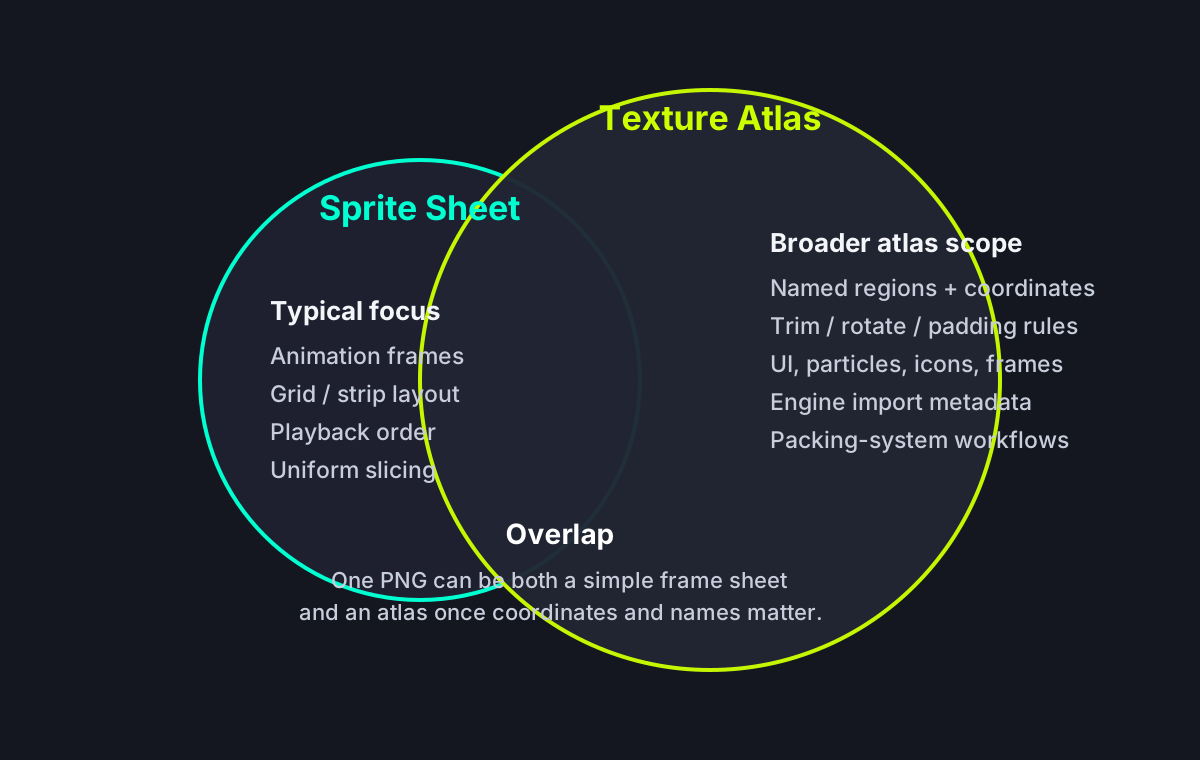
A sprite sheet and a texture atlas are related, but they are not always the same thing. In casual game-dev conversation, people often use both terms for one packed PNG image. In engine and tooling workflows, the difference is usually metadata, purpose, and scale. A sprite sheet is often frame-based animation art arranged in a predictable grid or strip. A texture atlas is a broader packing asset that pairs one image with coordinates, names, trim data, and sometimes multiple categories of assets such as UI icons, particles, and animation frames. This guide explains the overlap, the real distinction, and which term fits your project better.
The Short Answer
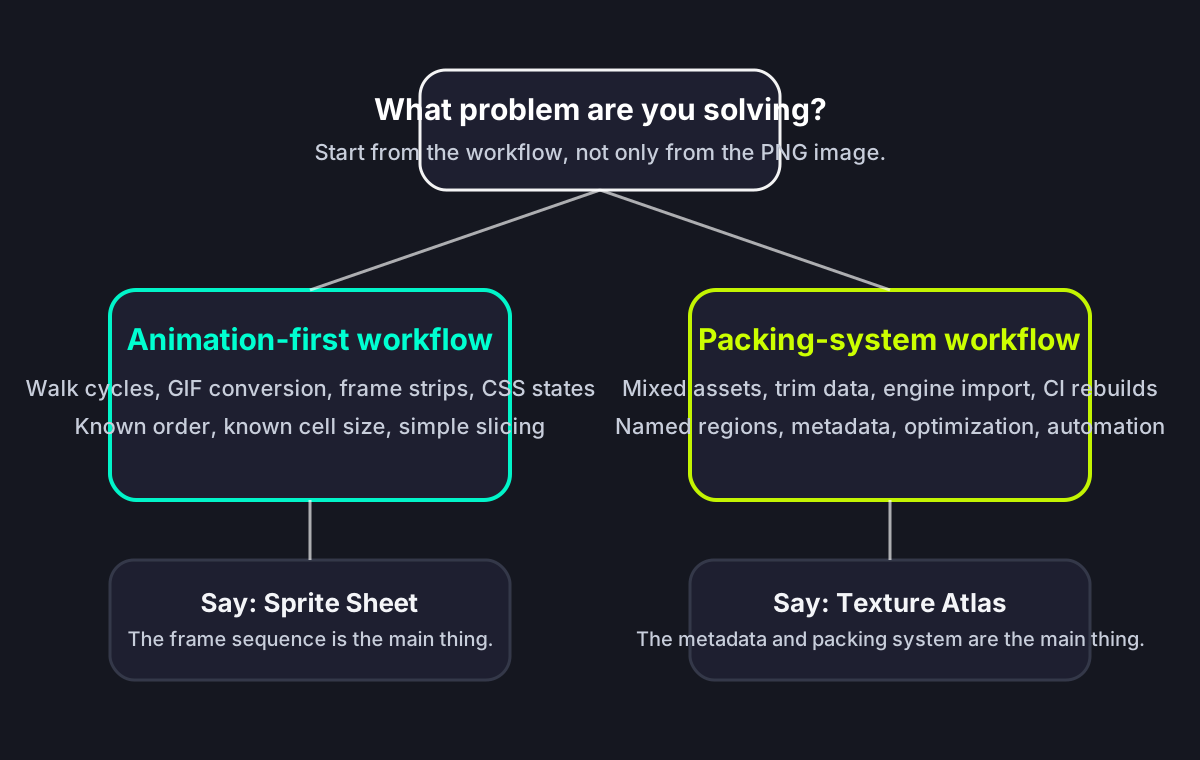
If you are packing character frames for a walk cycle, saying sprite sheet is usually precise enough. If you are shipping a runtime asset package with named regions, trim data, packing metadata, padding rules, and mixed asset types, texture atlas is the more accurate term. A uniform PNG grid may work without metadata; an irregular packed atlas usually does not.
Sprite sheet is usually animation-first
A sprite sheet often describes sequential frames for characters, effects, or UI states. The layout is commonly a grid, horizontal strip, or vertical strip, and the main goal is frame playback.
Texture atlas is metadata-first
A texture atlas usually describes packed subtextures with coordinates, names, trim rules, and import structure. The goal is rendering efficiency and asset organization, not only animation playback.
The Overlap and the Difference
Fact-by-Fact Comparison
This is the practical decision surface: what changes in tooling, engine expectations, and production workflows.
| Comparison Dimension | Sprite Sheet | Texture Atlas |
|---|---|---|
| Primary purpose | Frame-based animation or repeated visual states in one image. | General asset packing for rendering efficiency and asset lookup. |
| Layout expectation | Often grid, strip, or another predictable frame sequence. | Can be irregularly packed rectangles with trimming and rotation. |
| Metadata requirement | May work with no metadata if frames are uniform and the grid is known. | Usually depends on metadata for coordinates, names, trimming, and import rules. |
| Asset mix | Mostly animation frames for one character, effect, or sequence. | Can include UI icons, particles, tiles, effects, and character frames in one package. |
| Engine language | Common in Phaser tutorials, CSS animation guides, and character frame workflows. | Common in TexturePacker, Unity Sprite Atlas, Godot import flows, and mobile optimization discussions. |
| Can the terms overlap? | Yes. A simple sprite sheet can also be stored and loaded as an atlas. | Yes. Many atlases contain animation frames that people casually call sprite sheets. |
When Sprite Sheet Is the Better Term
Use sprite sheet when the visual asset is mainly about ordered frames. The most common examples are walk cycles, attack animations, character idle loops, GIF-to-sheet conversion, CSS hover states, and retro game frame strips. In these cases, developers usually care about frame order, playback speed, and cell size more than they care about packing algorithms.
Uniform frame grids
If every frame is 64x64 or 128x128 and your engine slices by rows and columns, sprite sheet is the natural term. RPG Maker, simple Godot imports, and many pixel-art workflows fit this pattern.
Sequential animation logic
If your code mostly says 'play frames 0 to 7' or 'load idle_0001 to idle_0006', you are thinking in animation-sheet terms. That is sprite sheet language.
CSS and web animation
Web developers often say sprite sheet because they are using one image and background-position offsets for a known visual sequence. Atlas terminology adds little value in that scenario.
When Texture Atlas Is the Better Term
Use texture atlas when packing is part of a broader rendering or asset-management workflow. Here the image is only one half of the asset. The coordinate map, trim data, frame names, rotation flags, padding strategy, and engine preset are what make the asset useful. This is the language used by TexturePacker, Unity Sprite Atlas, many mobile optimization guides, and production pipelines that rebuild atlases automatically.
Mixed assets in one packed texture
If one packed image holds buttons, icons, particles, enemies, and decorative effects, texture atlas is the accurate term. The file is serving rendering efficiency across many asset categories.
Irregular packing and trimming
If your pipeline rotates frames, trims transparent edges, or uses polygon packing, you are firmly in texture-atlas territory. A simple sheet no longer describes the full workflow.
Import automation
If the atlas rebuilds in CI or your engine consumes XML or JSON metadata directly, texture atlas is the better term because metadata is now a first-class artifact.
Atlas Details That Affect Real Projects
The practical difference shows up when the texture is no longer a simple equal-cell grid. These settings decide whether the asset imports cleanly or creates blurry, offset, or missing frames.
Padding and extrusion prevent bleeding
Texture atlases need transparent padding or edge extrusion so bilinear filtering does not sample neighboring frames. This matters most when sprites are scaled, rotated, or rendered with mipmaps.
Trimmed frames need source-size metadata
When transparent edges are trimmed, the metadata must preserve the original source size and frame offset. Without that data, animations can jitter or appear off center.
Rotation requires loader support
Some packers rotate rectangles to save space. Only use rotated atlas frames if your runtime loader explicitly supports rotation metadata.
Named frames change code shape
A grid can be addressed by index. An atlas is usually addressed by frame names such as idle_0001 or button_pressed, so naming conventions become part of the pipeline.
Which Workflow Are You Actually In?
Why the Terms Get Confused
Three things create most of the confusion. First, many tutorials simplify the concept and only show one PNG image, so users never see the metadata file. Second, tools such as TexturePacker export atlas data for what still looks like a classic sprite sheet. Third, engines blur the terminology by using atlas loaders or atlas resources in different ways. Phaser can load JSON Hash for character frames, PixiJS can consume TexturePacker-style JSON, Godot can use AtlasTexture or SpriteFrames from a PNG, and Unity can slice or pack sprites through its editor tools. The same asset may be called a sprite sheet by an artist, a texture atlas by a tools engineer, and a spritesheet resource by a runtime API.
Artists focus on frames
Artists and animators usually care about the visual sequence, spacing, and consistency of frames. They naturally say sprite sheet.
Engineers focus on metadata
Programmers and tools engineers care about import structure, file format, rebuild automation, and draw-call optimization. They naturally say texture atlas.
Tools sit between both worlds
Tools such as Sprite Sheet Maker bridge the gap by letting you start with frames, then export atlas metadata in JSON, XML, or CSS formats.
Sprite Sheet vs Texture Atlas FAQ
Build the Right Asset for Your Engine
Use Sprite Sheet Maker when you need a clean frame sheet plus metadata that fits your loader. Export a simple PNG grid when that is enough, or choose JSON/CSS/XML only when your pipeline consumes it correctly.