
When to Use Sprite Sheet Maker
Sprite Sheet Maker is excellent when you need fast browser-based packing, GIF conversion, privacy-friendly local processing, and standard JSON/CSS/XML exports. It is the wrong choice when your workflow depends on CI automation, polygon packing, advanced metadata editing, or art creation inside the same tool. This guide gives you the honest boundary line so you can pick the right tool for the job.
The Simple Rule
Use Sprite Sheet Maker when you already have frames, want to pack them quickly, and only need standard atlas metadata. Do not use it when you need the atlas pipeline itself to be programmable, deeply engine-specific, or tightly coupled to art creation. That distinction matters because many sprite tools overlap at the output layer while solving totally different workflow problems upstream.
What the tool is best at
Sprite Sheet Maker is strongest at quick one-off or repeat browser tasks: combining frames, extracting GIF frames into a sheet, previewing animation order, and exporting JSON Hash, JSON Array, CSS, or XML TextureAtlas without installing anything.
What the tool is not built for
It is not a production atlas compiler, not a pixel-art editor, not a timeline-driven animation package, and not a full metadata authoring environment. If your workflow depends on any of those roles, another tool should own that part of the pipeline.
Quick Decision Boundary
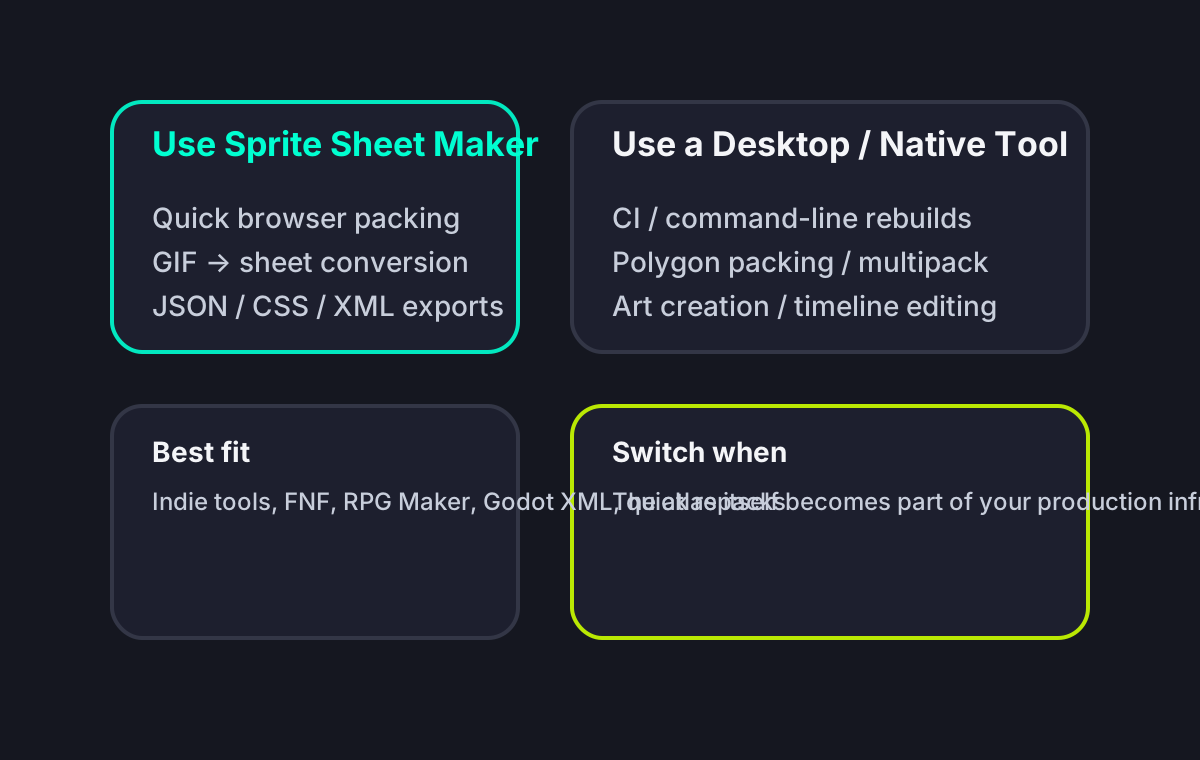
Use Sprite Sheet Maker When...
These are the workflows where the browser-first tradeoff works in your favor rather than against you.
You need quick packing without setup
You have a folder of PNG frames and want to turn them into a sprite sheet right now, without downloading software, moving machines, or setting up a project file. This is the most obvious and best fit use case.
You need GIF to sprite sheet conversion
If the source material is an animated GIF, Sprite Sheet Maker removes the friction of extracting frames first in another tool. Upload the GIF, review the frame list, pick your layout, and export the packed result in one browser workflow.
You want privacy-friendly local processing
All the main image processing happens in the browser, so source files do not need to be uploaded to a remote server. That makes it a good fit for quick internal art handling, prototype assets, or teams that prefer local-first tooling.
Your engine only needs standard atlas output
If JSON Hash, JSON Array, CSS sprites, or XML TextureAtlas are enough for Phaser, Pixi.js, Godot, Unity via XML importer, or simple web animation, the browser tool covers the practical output layer without extra complexity.
You work across many devices
A designer on an iPad, a developer on a MacBook, and a modder on a borrowed Windows laptop can all open the same tool instantly. That zero-install portability is hard to match with desktop-first sprite pipelines.
You are building FNF, RPG Maker, or simple indie pipelines
For common rectangular workflows such as FNF character atlases, RPG Maker 3x4 sheets, lightweight Godot imports, or quick Phaser/Pixi animation atlases, the output quality is already good enough without paying the complexity tax of a studio packer.
You need a decision tool, not a long-lived authoring system
Sometimes the right tool is the one you can open, use for ten minutes, export from, and close. If the atlas is not the long-term source of truth in your project, simplicity wins.
Use a Different Tool When...
These are the cases where the browser model becomes the limit rather than the advantage.
You need CI or command-line atlas rebuilds
If your atlases rebuild on every commit, you need a command-line tool such as TexturePacker CLI. Sprite Sheet Maker does not currently provide deterministic atlas compilation inside CI pipelines.
You need polygon packing or advanced trimming
Irregular sprites, tight mobile VRAM budgets, or large effects atlases often benefit from polygon mesh trimming and more aggressive packing strategies. That is a desktop packer problem, not a browser rectangle-packing problem.
You are creating the art itself
If your main task is drawing, onion skinning, palette editing, or timeline-based animation authoring, use Aseprite, Piskel, Photoshop, Krita, or another editor. Sprite Sheet Maker starts after the art already exists.
You need engine-native atlas integration
For Unity Sprite Atlas workflows, engine-native import rules, or platform-specific texture pipelines, the engine's own atlas system or a tightly integrated exporter is often the better home for the final asset build step.
You need platform-specific texture compression decisions
Sprite Sheet Maker does not decide ASTC, ETC2, PVRTC, or other platform texture compression policies. That belongs in your engine importer or a platform-aware asset pipeline.
You need pivot, 9-slice, hitbox, or tag-heavy metadata
If every sprite needs anchor points, custom hit areas, per-sprite pivots, slices, or deeper metadata controls, a richer atlas authoring tool is a better fit. Sprite Sheet Maker focuses on frame rectangles and practical exports.
You are building tilemaps or tilesets rather than animation sheets
Tilemaps have different downstream requirements from character or VFX sprite sheets. For tile editing and placement workflows, Tiled, Aseprite, or engine-native map tooling usually makes more sense.
Your source assets are huge, sensitive, or unstable in browser memory
When source files are so large that browser tabs become unreliable, or when a fully offline desktop workflow is mandatory, desktop tools remain safer and more predictable.
Best Alternative by Need
The right alternative depends on what part of the workflow you are trying to improve.
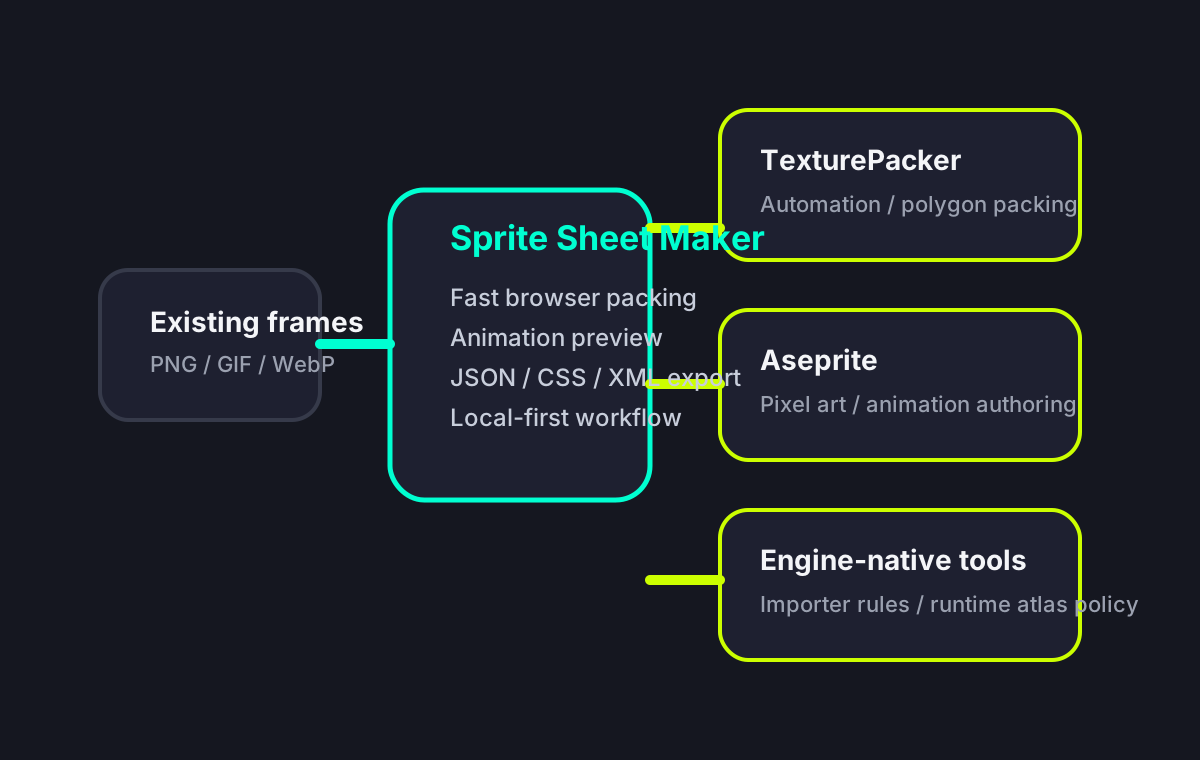
TexturePacker for automation and advanced packing
Choose TexturePacker if your problem is CI integration, polygon trimming, multipack, or engine preset depth. It is the strongest replacement when atlas generation itself is production infrastructure.
Aseprite for art creation and animation authoring
Choose Aseprite if your problem is drawing, editing, timing, or organizing animation loops. It solves the upstream art workflow that Sprite Sheet Maker intentionally does not try to own.
Engine-native atlas tools for final runtime integration
Choose your engine's own atlas pipeline if your real requirement is platform compression, importer automation, runtime batching policy, or build-time asset compilation tightly bound to the engine.
Where Sprite Sheet Maker Sits in the Pipeline
When to Use Sprite Sheet Maker FAQ
Use the Right Tool for the Right Job
If your workflow matches the browser-first model, open Sprite Sheet Maker now. If not, compare it against TexturePacker or Aseprite before you commit to a longer pipeline.